
Table of Contents
MCU vs MPU: How to Choose the Right Processor Component for Your Electronic Design
Introduction
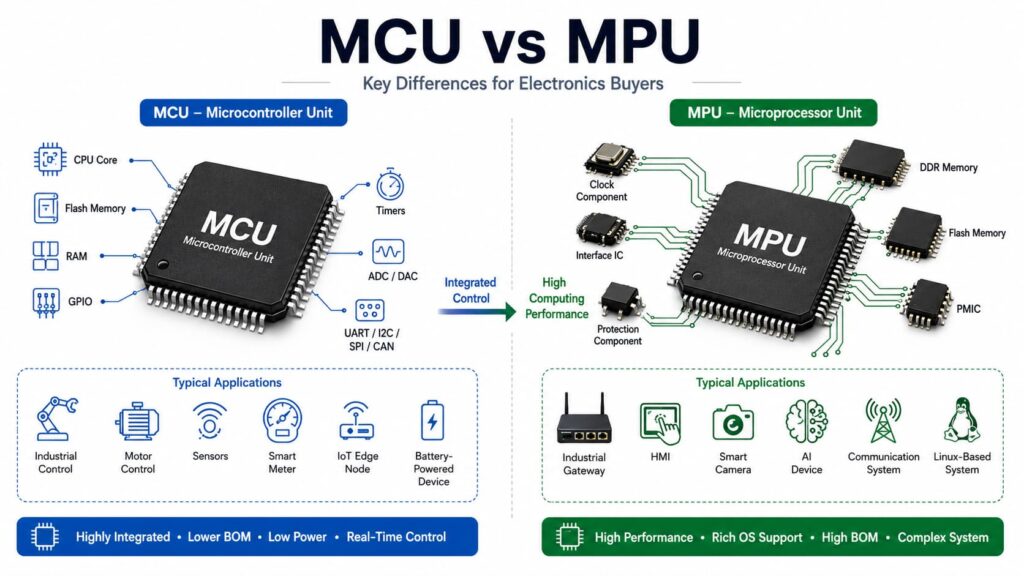
MCUs and MPUs are two common processor components used in modern electronic systems. They may look similar to some buyers, but they are designed for different jobs.
An MCU, or microcontroller unit, is usually used for control tasks. It often includes a processor core, memory, input/output pins, timers, and other basic functions in one chip. This makes it useful for real-time control, low-power devices, and cost-sensitive products.
An MPU, or microprocessor unit, is mainly used for higher computing performance. It usually needs external memory, power management, and other supporting components. MPUs are often used in systems that need multitasking, image processing, data processing, advanced software, or operating systems such as Linux.
For engineers, procurement teams, and electronics buyers, choosing between an MCU and an MPU is not only a technical decision. It also affects BOM cost, component availability, power design, replacement options, delivery risk, and long-term supply.
What Is an MCU?
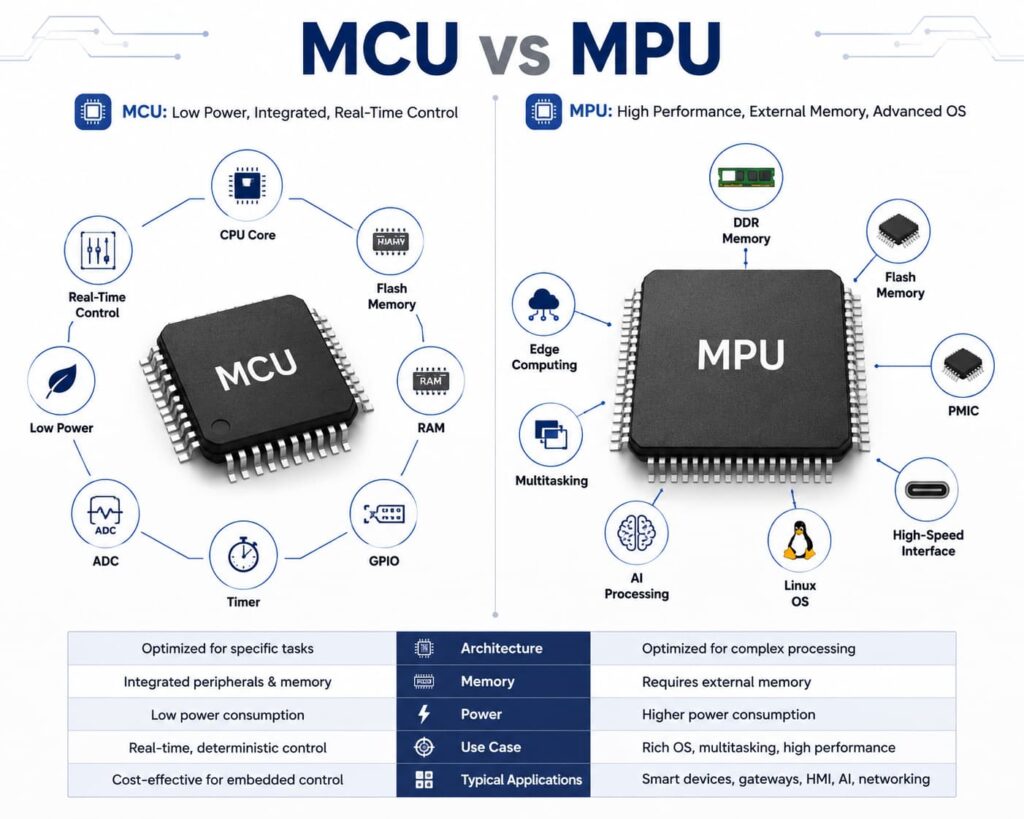
An MCU is a highly integrated control chip. It is designed to perform specific tasks in an embedded system.
A typical MCU may include:
CPU core
Flash memory or other non-volatile memory
RAM
GPIO pins
Timers
ADC or DAC functions
Communication interfaces such as UART, I2C, SPI, or CAN
Because many functions are already integrated, an MCU can reduce the number of external components needed in a design. This helps simplify sourcing and inventory control.
Common MCU Applications
MCUs are widely used in:
Industrial control devices
Motor control systems
Sensors and monitoring equipment
Smart meters
Medical portable devices
Automotive control modules
Consumer electronics
IoT edge nodes
Battery-powered devices
MCUs are suitable when the product needs stable control, fast response, low power consumption, and predictable operation.
What Is an MPU?
An MPU is a higher-performance processor. It is used when the system needs more computing power than a simple MCU can provide.
Unlike most MCUs, an MPU usually does not include all memory and peripherals inside one chip. It often needs external components such as:
– DDR memory
– Flash memory
– PMIC
– Clock components
– Interface ICs
– Protection components
– Power devices
This means an MPU-based design can offer stronger performance, but it also increases BOM complexity and sourcing work.
Common MPU Applications
MPUs are often used in:
Edge computing devices
Industrial gateways
Human-machine interfaces
Smart cameras
AI-enabled devices
Advanced medical equipment
Communication systems
Multimedia devices
Linux-based embedded systems
MPUs are better when the product needs multitasking, high-speed data handling, graphics, networking, or a full operating system.
MCU vs MPU: Main Differences
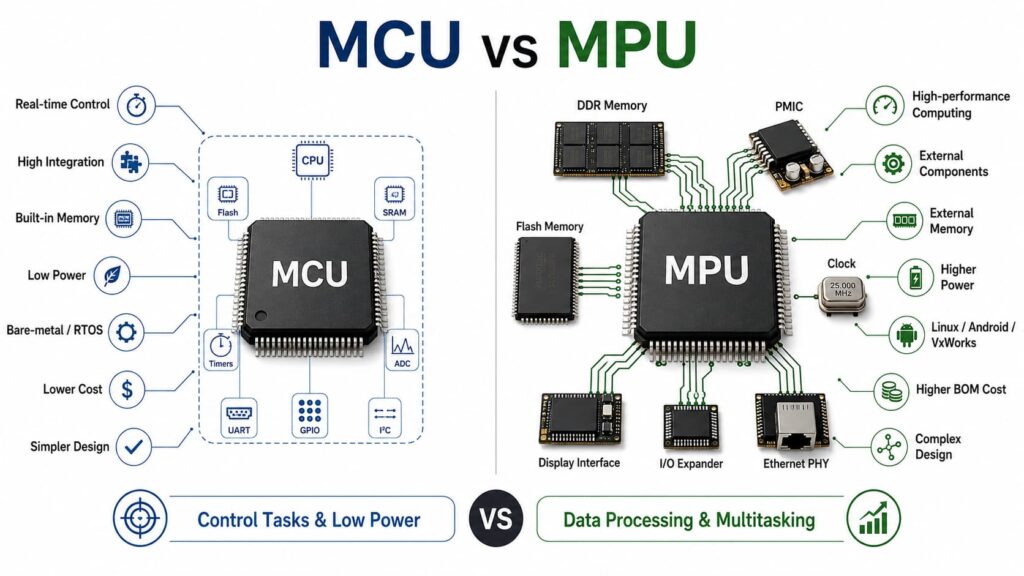
| Item | MCU | MPU |
|---|---|---|
| Main Role | Real-time control | High-performance computing |
| Integration | High integration in one chip | Needs more external components |
| Memory | Usually built-in memory | Usually external memory required |
| Power Consumption | Lower | Higher |
| Software | Bare-metal or RTOS | Linux, Android, VxWorks, or other OS |
| Cost | Lower total component cost | Higher total BOM cost |
| Design Complexity | Simpler | More complex |
| Best For | Control tasks and low-power devices | Data processing and multitasking |
MCUs are usually optimized for low power, lower cost, and real-time embedded control. MPUs provide stronger processing ability and flexibility, but they normally require more external components and more complex power management.
Performance: Do You Need Control or Computing Power?
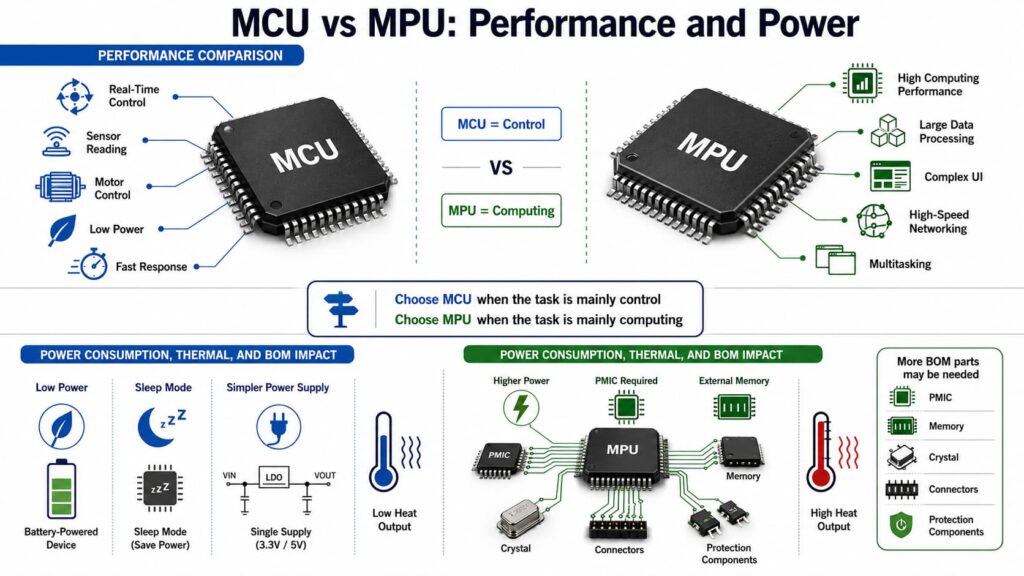
Performance is one of the most important differences between MCU and MPU.
An MCU is usually enough when the device only needs to read sensors, control motors, manage simple communication, or respond to input signals. It can handle these tasks with low power and fast response.
An MPU is more suitable when the system needs to process large data, run a complex user interface, support high-speed networking, or run multiple software tasks at the same time. Many modern MPUs use higher clock speeds and multi-core architectures, which makes them suitable for heavier computing tasks.
Simple Selection Rule
Choose an MCU when the task is mainly control.
Choose an MPU when the task is mainly computing.
Power Consumption and Thermal Considerations
Power consumption affects product size, battery life, reliability, and component selection.
MCUs are normally better for low-power products. Many MCUs support sleep modes, low-power operation, and simple power supply structures. This is important for battery-powered sensors, portable devices, and remote monitoring products.
MPUs usually consume more power because they have higher performance, more complex cores, external memory, and high-speed interfaces. Many MPU systems also require a dedicated PMIC to supply different voltage rails.
For procurement teams, this means an MPU project may require more related parts in the BOM, including PMICs, memory chips, crystals, connectors, and protection components.
Cost and BOM Impact
The purchase price of the main chip is only one part of the total cost.
An MCU may help reduce total BOM cost because many functions are integrated into the chip. It may also reduce sourcing complexity because fewer supporting components are needed.
An MPU may increase total BOM cost because it often needs external memory, power management ICs, interface components, and more supporting devices. Even when the MPU price looks acceptable, the full BOM should be checked carefully.
Cost Factors to Compare
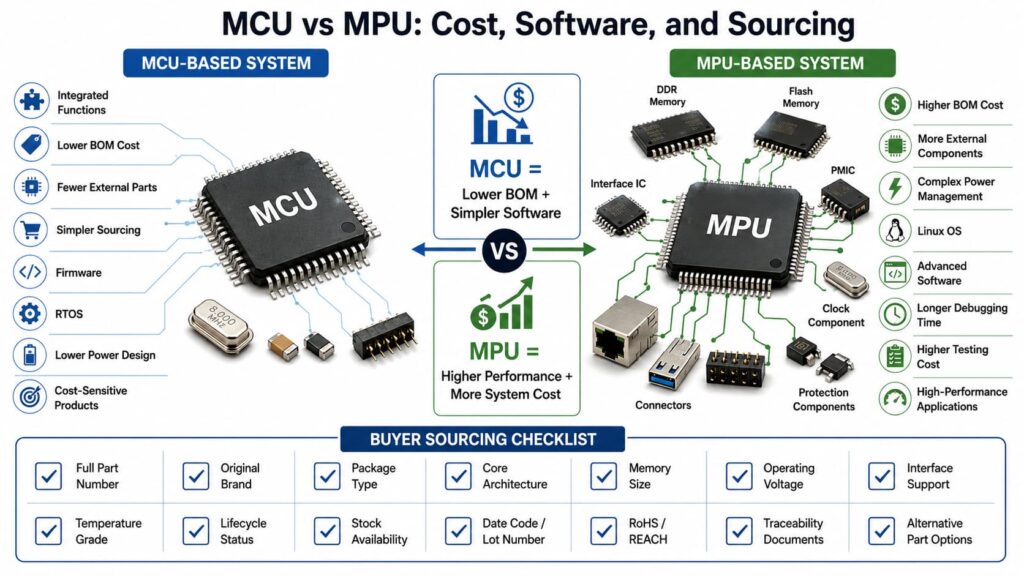
When comparing MCU and MPU options, buyers should check:
– Main chip unit price
– External memory cost
– PMIC cost
– Supporting passive components
– Connector and interface requirements
– Software development cost
– Testing and validation cost
– Long-term availability
– Alternative part options
For mass production, even a small component cost difference can affect the total project budget.
Software and Operating System Requirements
Software is another major selection factor.
MCUs usually run simple firmware or an RTOS. RTOS means real-time operating system. It helps the device respond to tasks within a predictable time.
MPUs can run more advanced operating systems such as Linux. This is useful for products that need file systems, networking, display control, advanced security, cloud connection, or complex user applications.
However, more advanced software also means more development work, longer debugging time, and higher technical requirements.
Sourcing Considerations for MCU and MPU Buyers
When sourcing MCUs or MPUs, buyers should not only compare part numbers. Similar part numbers may have different package types, temperature grades, memory sizes, firmware support, or lifecycle status.
Before placing an order, confirm:
– Full manufacturer part number
– Brand and original source
– Package type
– Core architecture
– Memory size
– Operating voltage
– Interface support
– Temperature grade
– Automotive or industrial grade requirement
– Date code and lot number
– Lifecycle status
– Stock availability
– Original packaging condition
– RoHS / REACH compliance
– Traceability documents
For long-term projects, lifecycle status is especially important. If the selected MCU or MPU is close to end-of-life, buyers may face shortage risk, price increase, or forced redesign.
Quality Control Checks Before Purchase
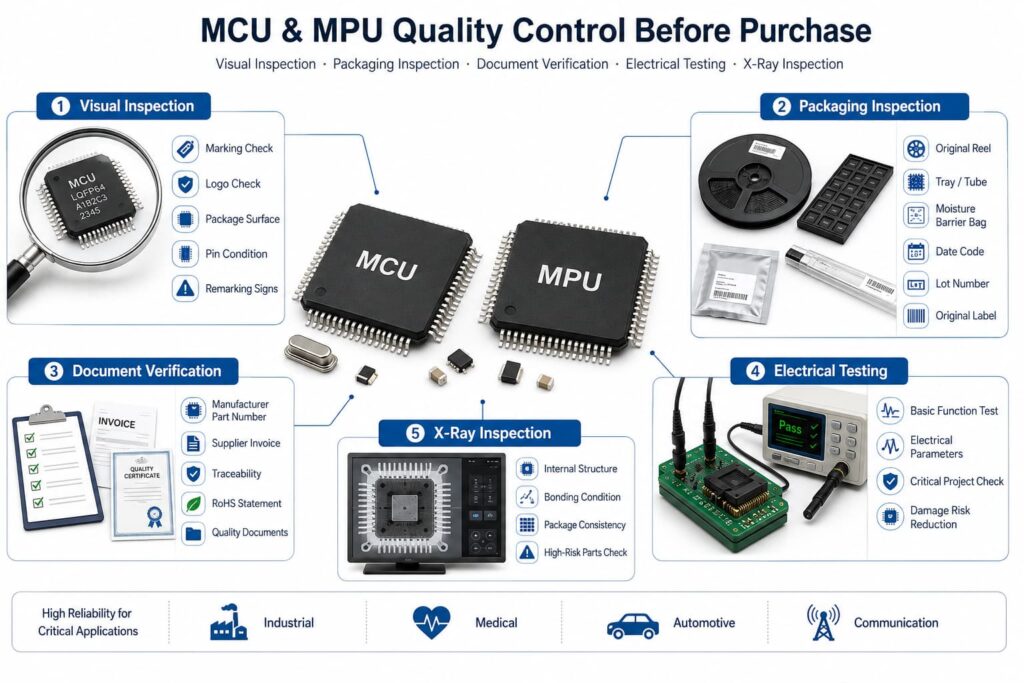
MCUs and MPUs are high-value semiconductor components. Quality control is important, especially for industrial, medical, automotive, and communication applications.
Recommended checks include:
Visual Inspection
Check the marking, logo, package surface, pin condition, and possible remarking signs.
Packaging Inspection
Confirm original reel, tray, tube, moisture barrier bag, label, date code, and lot information.
tube, moisture barrier bag, label, date code, and lot information.
Document Verification
Check the manufacturer part number, supplier invoice, traceability, RoHS statement, and quality documents.
Electrical Testing
For critical projects, electrical testing can help verify basic function and reduce the risk of counterfeit or damaged components.
X-Ray Inspection
X-ray inspection may be used to check internal structure, bonding condition, or package consistency for high-risk parts.
MCU or MPU: Which One Should You Choose?
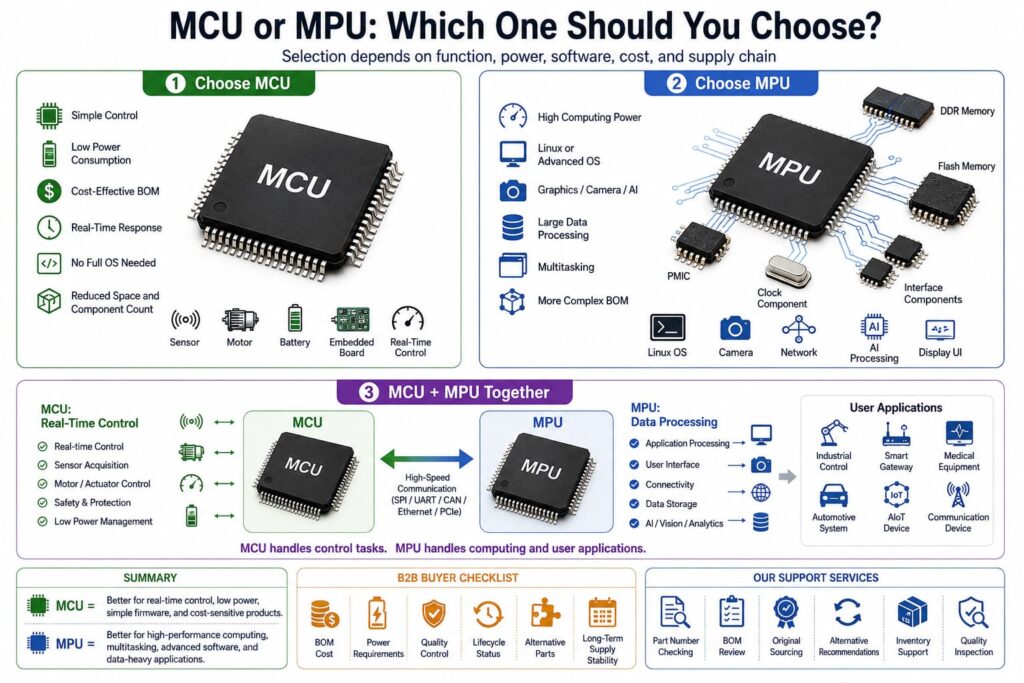
There is no single answer. The right choice depends on the product function, power budget, software needs, cost target, and supply chain plan.
Choose an MCU when:
The device needs simple control
Low power consumption is important
The BOM must stay cost-effective
Real-time response is required
The system does not need a full operating system
Space and component count must be reduced
Choose an MPU when:
The device needs high computing power
The system must run Linux or another advanced OS
The product needs graphics, camera, AI, or large data processing
Multitasking is required
External memory and PMIC are acceptable
The project can support a more complex BOM
In some advanced products, MCU and MPU may be used together. The MCU can handle real-time control, while the MPU handles data processing and user applications.
Conclusion
MCUs and MPUs are both important processor components, but they serve different roles.
An MCU is better for real-time control, low power consumption, simple firmware, and cost-sensitive embedded products. An MPU is better for high-performance computing, multitasking, advanced software, and data-heavy applications.
For B2B buyers, the right choice should consider more than technical performance. It should also include BOM cost, power requirements, quality control, lifecycle status, alternative parts, and long-term supply stability.
If you are sourcing MCUs, MPUs, PMICs, memory chips, or related semiconductor components, we can support part number checking, BOM review, original component sourcing, alternative recommendations, inventory support, and quality inspection.
FAQ
1. Is an MCU the same as an MPU?
No. An MCU is a microcontroller used mainly for control tasks. An MPU is a microprocessor used mainly for higher computing tasks. They have different structures, power needs, and application areas.
2. Which is better, MCU or MPU?
Neither is always better. An MCU is better for low-power control applications. An MPU is better for complex software, high-speed data processing, and multitasking.
3. Why does an MPU need more external components?
Many MPUs need external memory, PMICs, clock components, and interface components. This gives the system more performance and flexibility, but it also increases BOM complexity.
4. Can an MCU run an operating system?
Some MCUs can run an RTOS, which is a lightweight real-time operating system. However, most MCUs are not designed to run full operating systems like Linux.
5. What should buyers check before sourcing MCUs or MPUs?
Buyers should check the full part number, package, temperature grade, memory size, lifecycle status, date code, stock source, original packaging, and traceability documents.